
Choose By the Contract
The November 20 update added a mode selection with two options. By the contract is highlighted as the recommended mode, and The hard way gives lower income and reduced bonuses from selected upgrades. Start with By the contract on a first run.
You also get three save slots, with achievements and settings shared between them. That makes it easy to keep a standard campaign and try Hard later in another slot. Our hard mode differences page explains what changes.
Understand the Contract
A 5,000,000 m³ asteroid will hit Earth in 90 days. You are the miner who took the job for free, saying the asteroid would pay for itself. Each day is one shift: fly down, dig, return and spend.
A big counter shows how many m³ are left. On the first day it hardly moves, and that is normal. Later your ship’s guns fire at the rock while you dig, and the number drops much faster.
Your First Shift on the Asteroid
You start with the pickaxe you brought. Swing it at exposed rock and ore, and collect what you can carry. On a controller, the right trigger swings the pickaxe.
Your air is the main time limit on each shift. Do not wander far on day one. Mine close to the lander so the trip back is short.
Get Back to the Lander in Time
The HUD shows your distance to the LANDER, so check it often. Anyone in the lander can start a 10-second countdown. If you are not aboard when it leaves the asteroid, you black out and lose your cargo.
A tether helps you find the way back from deep holes, and a November 19 patch improved its return paths from shafts and pits. Our how to return to the lander page covers the details. On day one, simply leave early with air to spare.
Sell Your Ore at the Trade Terminal
Back on the ship, sell your haul at the trade terminal. An official screenshot shows five ores listed there: Space ice, Meteoric iron, Star gold, Space crystal and Plasmite. Each has its own price for the day, so values shift between days.
The same screen shows terminal skills such as Refining, which raises ore price, and Buyers, which raises demand for ore. A capsule takes your sold ore to Earth. On a controller, use the right stick to sell.
Spend Your First Credits
Look at what ended your shift. If your cargo filled up with air left, buy more capacity. If air ran out first, buy more air, and if you mined too slowly, buy a better tool.
The Workshop lists the tools in order: pickaxe, sledgehammer, drill, laser, plasma cutter and missile swarm. Demo players report different early routes, such as a hammer first or saving for the drill. Our best early upgrades page compares them.
Your First Ship Gun
Your ship starts with no guns. You buy them with ore money, and they fire at the asteroid on their own while you dig. That is how the counter starts falling quickly.
In an official Engineering screenshot, the cheapest gun is the Turret at 1,250 credits. More powerful guns cost far more. See No Asteroids ship gun prices for all nine.
Explore the Ship Between Shifts
The ship is more than a menu. Items you find in the rock go to the ship’s museum, and the observation dome has a telescope pointed at Earth. Through it, you can see a crowd holding KEEP WORKING signs.
Demo players also report daily bonuses for cleaning the lander. Check our lander washing bonus page for what is confirmed. Then head down for the next shift.
Read the Day Counter
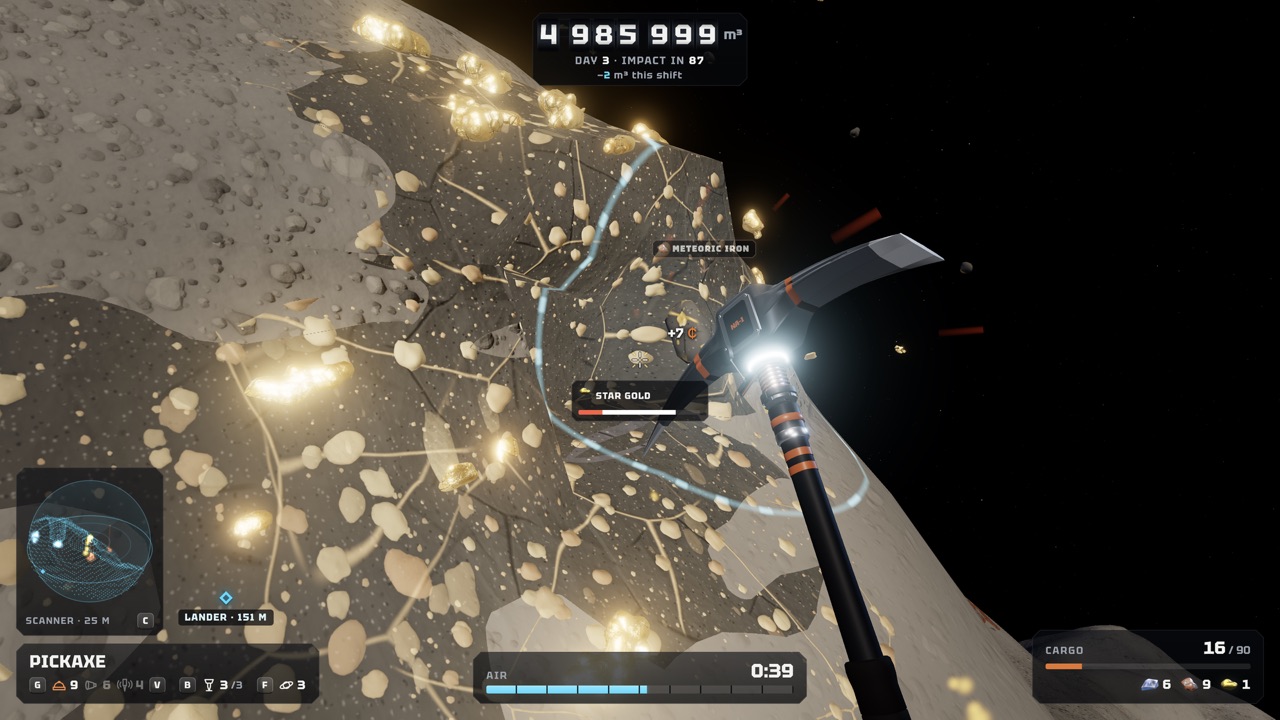
The counter at the top of the HUD tracks the whole contract. In an official day-3 screenshot, it reads 4,985,999 m³, with DAY 3 · IMPACT IN 87 underneath. A third line shows the m³ removed this shift.
Each piece of ore you break shows a small credit pop-up, such as +7 in that screenshot. Since November 20, the combo display shows an ore icon and a multiplier. The old cash counter beside the crosshair was removed because it was misleading.
Controls for Your First Shift
You can play with mouse and keyboard or a controller. On a controller, the right trigger swings the pickaxe, and the right stick sells your haul at the trade terminal. Gamepad settings let you change stick sensitivity, invert the vertical look axis and toggle rumble.
Keyboard players can rebind keys in Settings since November 19, and on-screen prompts follow your bindings. Tutorial cards appear early on. Since November 21, you can dismiss them without accidentally using an item.
Common First-Day Mistakes
Most early problems come from a few habits. Avoid these on your first days:
- Digging far from the lander before you know how long the trip back takes.
- Staying out until your air is almost gone.
- Returning straight away without mining; the game now asks you to confirm this on a solo landing.
- Spending on a new tool when your cargo or air is what actually ended the shift.
Frequently Asked Questions
Can I do my first playthrough in co-op?
Yes. Up to 8 players can dig the same asteroid in online co-op. The campaign is the host’s save.
Which difficulty should I pick first?
By the contract. The developer highlights it as the recommended mode; The hard way gives less ore and lower income.
How long is a full playthrough?
The developer says the main contract takes about 6 to 9 hours alone.
What happens if I miss the lander?
You black out and lose your cargo, according to the store description.
What should I buy first?
Whatever limited your last shift: cargo capacity, air or a faster tool. Player routes differ, so no single order is confirmed.
Official Video
Sources and Further Reading
- Steam · No Asteroids store page (app 5527800)
- Unruled Games · No Asteroids game page and press kit
- Unruled Games · Save Slots, Hard Mode & Co-op Improvements (Nov 20)
- Unruled Games · The No Asteroids demo now supports controllers (Nov 12)
- Unruled Games · Keyboard Rebinding & Co-op Fixes (Nov 19)
- Unruled Games · Stronger Drones, Tunnel Mode & Co-op Fixes (Nov 21)
- Unruled Games · Fixes and Improvements (Nov 19)
- Steam discussion · Upgrade Approach and Sequence
- Unruled Games · Official Workshop screenshot
- Unruled Games · Official Engineering screenshot (GUNS tab)
- YouTube · Unruled Games, Gameplay Trailer (Nov 3)
- YouTube · Z1 Gaming, No Asteroids Demo (Nov 15)
- YouTube · Sonoket Gaming, No Asteroids Part 1 (Nov 20)