
Is There a No Asteroids Map?
No official map or complete map collection had been published as of November 21, 2026. We also found no verified list of fixed ore coordinates. You dig your own tunnels, so the asteroid changes shape as you mine.
Instead of a map, the game gives you HUD readouts. The scanner, the lander distance and the tether help you find ore and the way back. The sections below explain each one.
The Main Asteroid
The main contract is one asteroid of 5,000,000 m³ that will hit Earth in 90 days. A counter at the top of the HUD shows the remaining volume, the day and the days until impact. You land on it every shift in the lander.
You can dig deep into the rock. One creator, Grillmastah, recorded an episode on reaching the center of the asteroid. The November 20 patch also fixed sudden camera flips when flying through the asteroid’s core.
Use the LANDER Distance
The LANDER readout at the bottom left shows how far you are from the lander. In an official screenshot, it reads LANDER · 151 M during a shift. A small diamond icon sits above it.
Check this readout often, especially as you go deeper. If the lander leaves without you, you black out and lose your cargo. Our return to the lander guide covers the trip back.
Use the Scanner for Ore
The scanner labels ore deposits in the area in front of you. Its readout sits next to the lander distance and shows the scan range, such as 25 m in an official screenshot. Floating labels name the ore, like Meteoric iron or Star gold.
Scan each new rock face to decide where to dig. That is the closest thing to an ore map the game offers. Read how to use the mineral scanner for details.
Use the Tether to Get Back
The tether helps you return from deep tunnels. The developer added an in-range indicator to it in the demo after player feedback. A November 19 patch improved tether return paths from deep shafts and pits.
Since November 21, teammates’ tether lines are visible too. That helps co-op crews track each other underground. Keep a clear route out while you dig.
The Ship Is Your Home Base
Between shifts, you walk around your ship. Patch notes mention a lower deck, an upper deck with a glass dome, an engine room and a Workshop. Official screenshots show a hangar with the lander, crew quarters, a kitchen and a trade terminal.
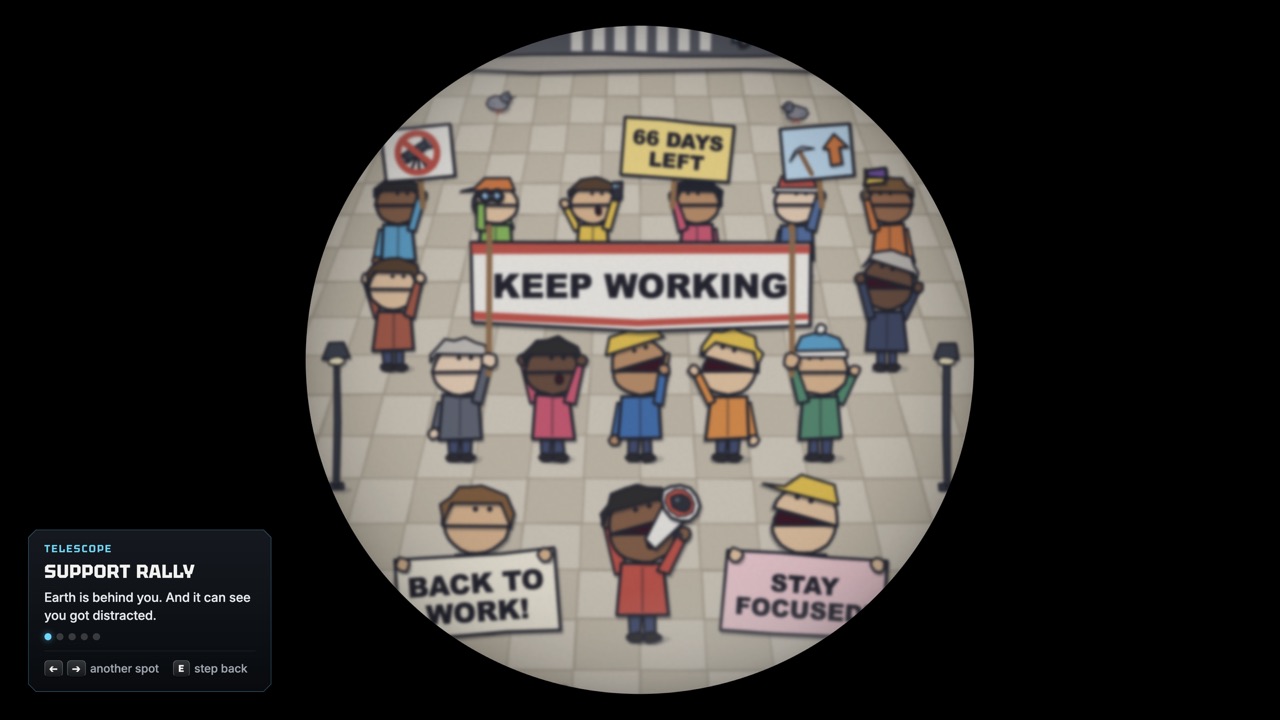
Items you find in the rock go to the ship’s museum. From the observation dome, you can look at Earth through a telescope. A crowd there holds KEEP WORKING signs.
Other Contracts After the Main Job
After the main contract, other clients send offers. The store gives one example: a space hotel wants a duck-shaped asteroid gone, because guests say it keeps staring at them. These later jobs use different asteroids.
We have not found a full list of post-contract asteroids or their layouts. We will add them once they are documented by an official source. A full no-commentary campaign by stenwick is one public route reference.
What You Can See From the Ship
The observation dome has a telescope pointed at Earth. The store describes what you can watch: a crowd holding KEEP WORKING signs, bookmakers taking bets on you and the government meeting on a beach. The plot at the impact point is already sold, and its owners rave about the sky view.
An official screenshot shows this view as a circular telescope image of a cartoon crowd. A November 19 patch fixed missing telescope controls after reopening it. It is a fun break between shifts.
Getting Around the Ship
Several patches fixed ship navigation problems. The November 20 update fixed a bug that could stop players from climbing the stairs to the upper deck, especially at high frame rates. It also fixed clipping through the edges of an excavated landing platform.
The November 19 patch fixed furniture pushing players through the ship’s walls and added recovery if a player falls outside the lower deck. It also fixed jumping through the upper deck’s glass dome. Update the game if you get stuck.
Video Routes Worth Watching
Since there is no map, gameplay videos are the best way to see the asteroid’s layout. Grillmastah’s November 19 episode follows a descent to the center of the asteroid. stenwick recorded a full campaign with the ending on November 12.
OutbackBiff’s November 13 episode shows a run that removed 99.9% of the asteroid. These are prerelease builds, so details may differ from the current game. Watch them for route ideas, not exact coordinates.
Frequently Asked Questions
Is there a minimap?
The HUD has a small scanner panel with a sphere view at the bottom left. No full map has been confirmed.
Where is the duck-shaped asteroid?
It is a post-contract job: after the main contract, a space hotel asks you to remove a duck-shaped asteroid.
Does No Asteroids have a map?
No official ore map has been published. Use the LANDER distance, the scanner and the tether to navigate.
Is there more than one asteroid?
Yes. After the main contract, other clients send offers, including a duck-shaped asteroid for a space hotel.
Can you dig to the center of the asteroid?
Yes. A creator recorded reaching the center, and a patch fixed camera flips when flying through the asteroid’s core.
Official Video
Sources and Further Reading
- Steam · No Asteroids store page (app 5527800)
- Unruled Games · No Asteroids game page and press kit
- Steam discussion · Tether Range UI, with developer replies
- Unruled Games · Fixes and Improvements (Nov 19)
- Unruled Games · Save Slots, Hard Mode & Co-op Improvements (Nov 20)
- Unruled Games · Stronger Drones, Tunnel Mode & Co-op Fixes (Nov 21)
- YouTube · Grillmastah, Reaching the Center of the Asteroid (Nov 19)
- YouTube · stenwick, full playthrough and ending (Nov 12)
- YouTube · OutbackBiff, 99.9% asteroid removal (Nov 13)